
1. Introduction: The Scale of the Problem
When you are responsible for the placement trajectory of 123 students, "coordination" ceases to be a soft skill and becomes a distributed systems problem. As the Placement Representative for the MCA batch (2025-2027) at PSG College of Technology, I was facing a logistical bottleneck that spreadsheets could not solve.
The "Data Silo" Crisis
Our data was fragmented across incompatible mediums:
- Attendance: Physical registers and sporadic Excel sheets.
- Communication: WhatsApp groups where critical instructions were buried under 500+ unread messages.
- Performance: LeetCode profiles that had to be manually checked, one by one.
- Deadlines: Verbal reminders that were easily forgotten.
The latency was unacceptable. If a student was falling behind in their preparation, I wouldn't know until it was too late. I needed a system that provided Real-time Observability and Automated Accountability.
Thus, PSGMX was born. It is not just an app; it is a specialized ERP (Enterprise Resource Planning) system tailored for the high-stakes environment of campus placements.
 Figure 1: The entry point. A clean, branded splash screen that establishes identity immediately.
2. System Architecture: The Modular Monolith
For a valid engineering reason, I chose a Service-Oriented Architecture (SOA) implemented within a modular monolith. This gives me the type-safety and refactoring capabilities of a single codebase while keeping business logic strictly separated from UI concerns.
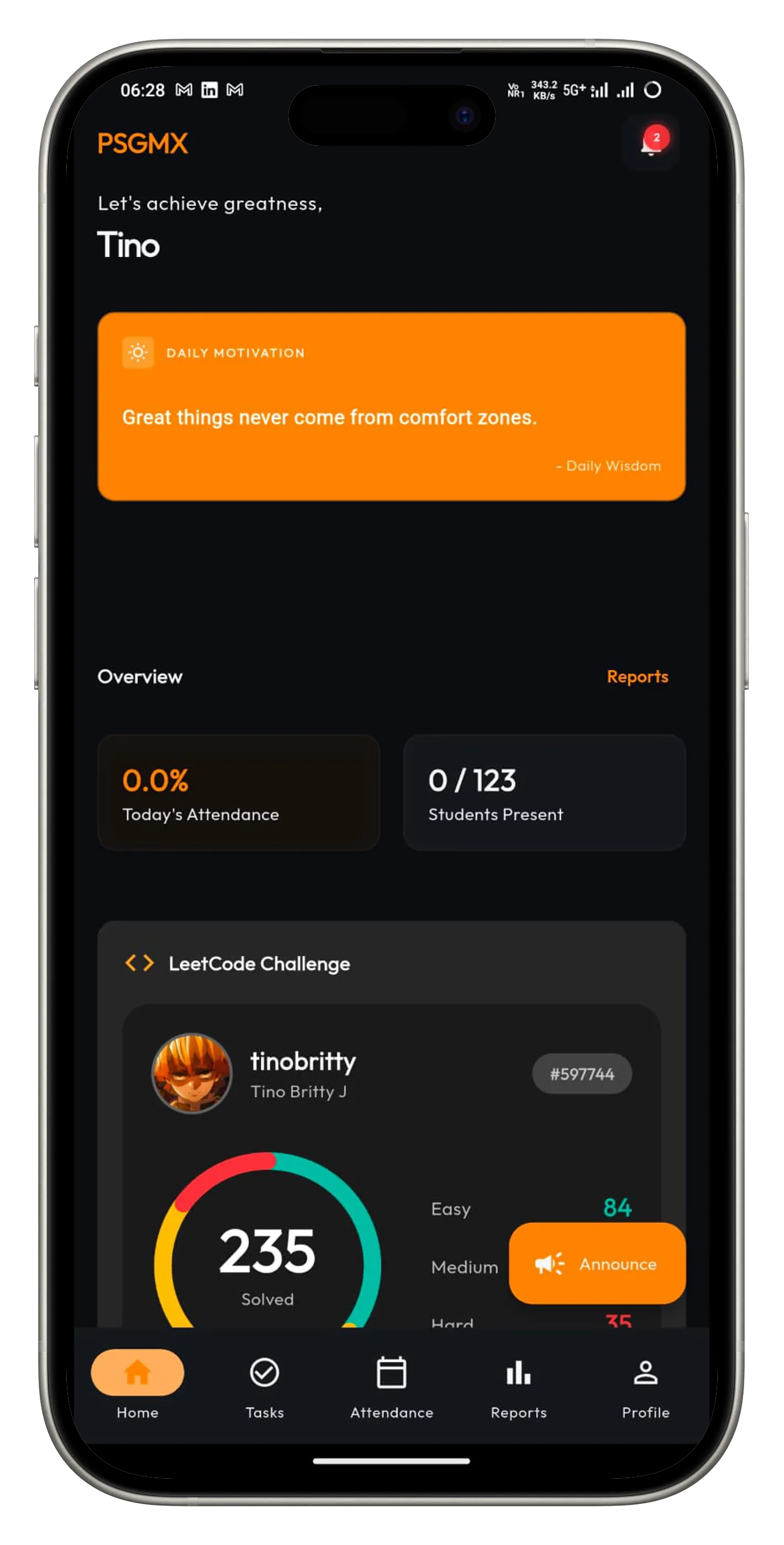 Figure 2: The Central Hub. Students get a "at-a-glance" view of their standing: Attendance percentage, LeetCode rank, and pending tasks.
A. The Tech Stack Decisions
| Component | Choice | Engineering Justification |
|---|---|---|
| Client Framework | Flutter 3.27+ | We needed to target Android (majority), iOS (minority but critical), and Web (admin dashboard) simultaneously. Flutter's Skia/Impeller engine ensures 60fps performance on low-end devices. |
| Backend-as-a-Service | Supabase | Managing a custom Node.js/Go backend requires maintaining EC2 instances/Containers. Supabase provides managed PostgreSQL, Auth, and Realtime subscriptions out of the box, reducing DevOps overhead to near zero. |
| Database | PostgreSQL | Relational integrity was non-negotiable. Attendance records must be consistently linked to students and dates. NoSQL was rejected due to the highly relational nature of the data. |
| State Management | Provider | While Riverpod and BLoC are popular, Provider offers the perfect balance of simplicity and power for this scale. It creates a clear Dependency Injection (DI) graph without the boilerplate of Redux-style reducers. |
B. Domain-Driven Directory Structure
I moved away from the traditional "Layer-based" packaging (putting all controllers in one folder, all views in another) to a Feature-based structure. This ensures that code related to "Attendance" lives together, making the codebase easier to navigate and refactor.
lib/
 core/
    theme/                 # Design System & Semantic Colors
    app_router.dart        # GoRouter Configuration
 database/                  # SQL Migrations & Schema definitions
 services/                  # Business Logic Layer (The "Brains")
    auth_service.dart      # OTP & Whitelist Logic
    attendance_service.dart
    supabase_db_service.dart
    notification_service.dart
 providers/                 # State Layer (The "Glue")
    user_provider.dart
    theme_provider.dart
    leetcode_provider.dart
 ui/                        # Presentation Layer
    attendance/            # Attendance Marking & Reports
    tasks/                 # Daily Task Dashboard
    profile/               # User Settings
    widgets/               # Reusable atomic components
 main.dart                  # Entry point & DI Setup
3. Database Engineering (PostgreSQL)
The heart of the system is a robust SQL schema. We use UUIDs tailored to Supabase's auth system to ensure that a user's database record is cryptographically tied to their login session.
Constraint-Driven Data Integrity
One of the biggest issues with the old manual system was duplicate data (e.g., a student being marked "Present" twice). I solved this at the database level using Composite Unique Constraints.
-- Prevents duplicate attendance entries for the same student on the same day
CREATE TABLE attendance_records (
    id UUID PRIMARY KEY DEFAULT uuid_generate_v4(),
    student_id UUID REFERENCES users(id),
    date DATE NOT NULL,
    status TEXT CHECK (status IN ('present', 'absent', 'od', 'leave')),
    marked_by UUID REFERENCES users(id),

    -- THE CRITICAL LINE:
    UNIQUE(student_id, date)
);
This simple line of SQL guarantees that no matter how many times a Team Leader taps the "Submit" button due to laggy internet, the database will reject duplicates, ensuring accurate statistics.
The Whitelist Security Pattern
Since this is an internal institutional tool, "Sign Up" is not open to the public. I implemented a Whitelist Table.
CREATE TABLE whitelist (
    email TEXT PRIMARY KEY,
    name TEXT NOT NULL,
    reg_no TEXT NOT NULL,
    batch TEXT NOT NULL
);
When a user attempts to log in:
- AuthService intercepts the email.
- It queries the
whitelisttable. - If the email is absent, the API call is aborted locally.
- If present, Supabase triggers the OTP.
This "Defense in Depth" strategy prevents unauthorized users from even consuming our SMS/Email quotas.
4. Feature Deep Dive: Intelligent Attendance & Analytics
The attendance module is more than a digital register; it is an analytics engine.
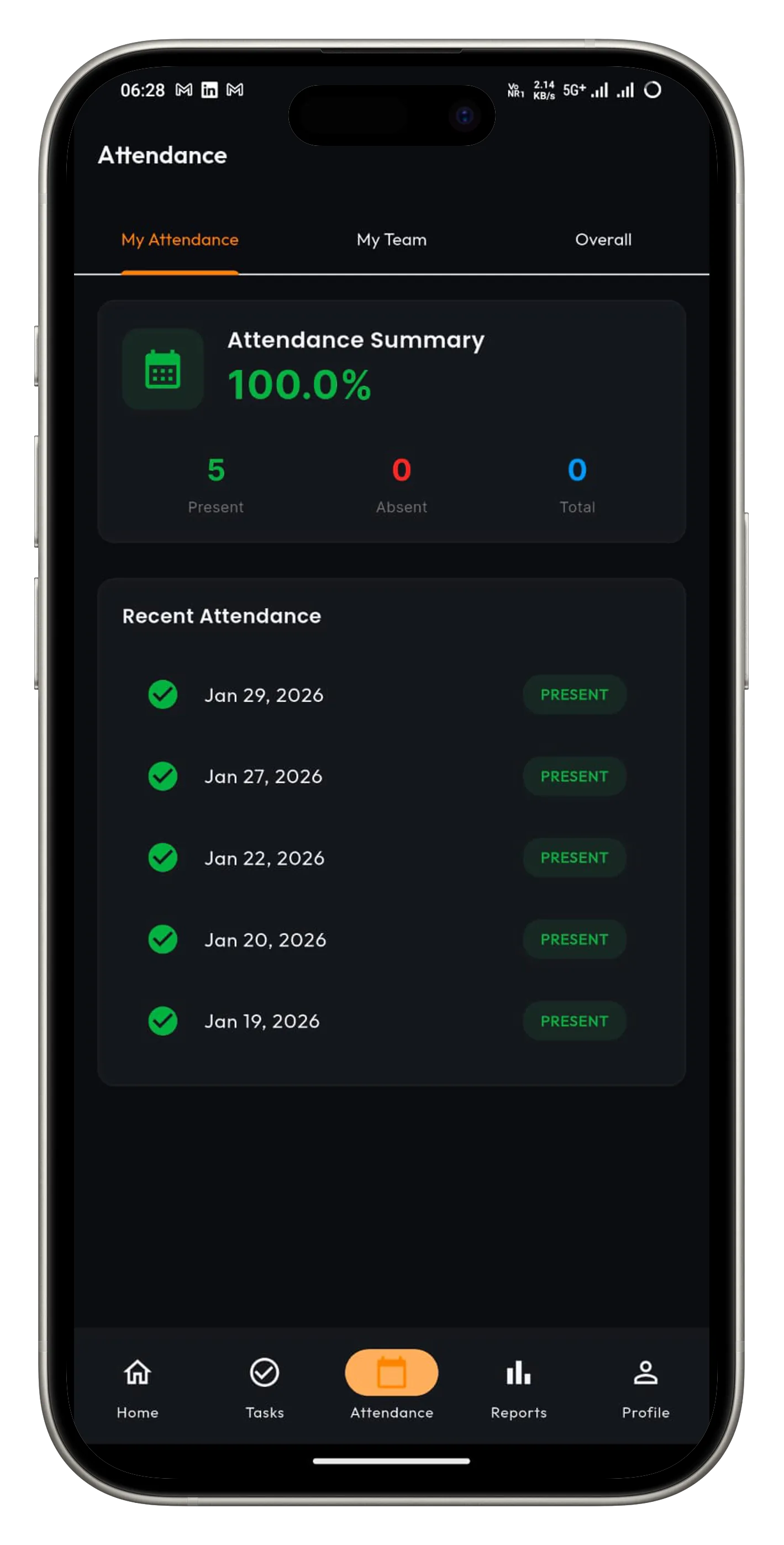 Figure 3: The Attendance Interface. Team Leaders see a streamlined list of their mentees. Switches toggle state instantly, and cards summarize the day's status.
Working Day Calculation
To calculate a student's attendance percentage accurately ($ \frac{Days Present}{Total Working Days} $), we first need to know the denominator: How many total working days have passed?
I built a scheduled_attendance_dates table that serves as the Source of Truth for the academic calendar. The AttendanceService queries this to dynamically calculate percentages.
// lib/services/attendance_service.dart

Future<List<DateTime>> getWorkingDaysWithinRange({
  required DateTime startDate,
  required DateTime endDate,
}) async {
  // Efficiently fetch only the 'is_working_day = true' dates
  final response = await _supabase
      .from('scheduled_attendance_dates')
      .select()
      .gte('date', startDate.toIso8601String())
      .lte('date', endDate.toIso8601String())
      .eq('is_working_day', true);

  return response.map((data) => DateTime.parse(data['date'])).toList();
}
This allows us to retroactively declare a past date as a "Non-Working Day" (e.g., due to a declared holiday), and every student's attendance percentage updates instantly across the app.
5. Task Management & Daily Drills
Consistency is key in placement preparation. The app enforces this via the Daily Tasks module.
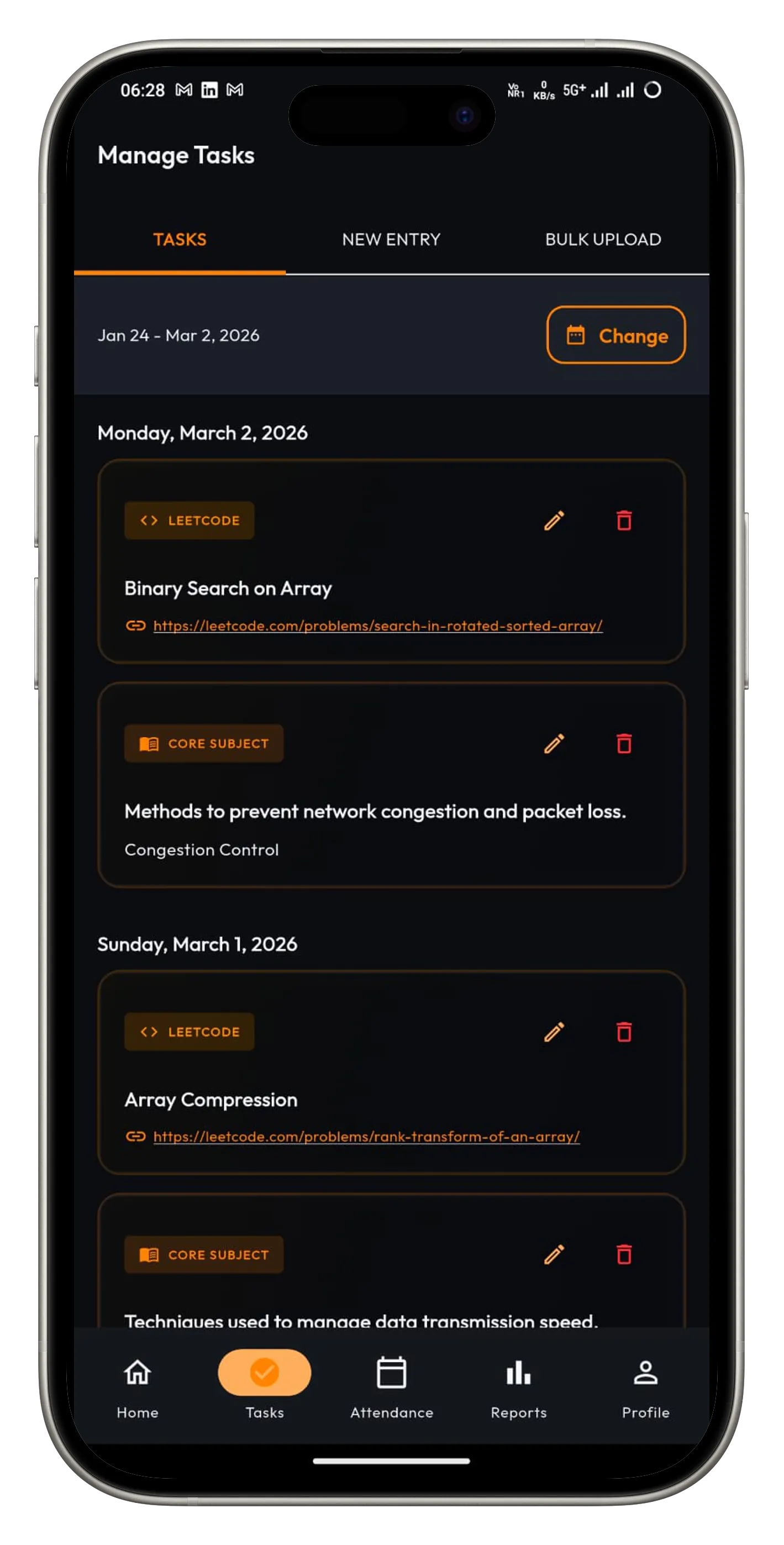 Figure 4: The Task Dashboard. Students receive a curated LeetCode problem (Easy/Medium) and a Core CS topic explanation every morning.
Every day at 8:00 AM, the system publishes:
- LeetCode Problem of the Day: A direct deep-link to the problem.
- Core CS Concept: A bite-sized explanation of a topic (e.g., "OS Paging" or "Normalization").
The data structure for this is polymorphic:
class CompositeTask {
  final String date;
  final String leetcodeUrl;
  final String csTopic;
  final String csTopicDescription;

  // Computed property to check if user has marked it done
  bool get isCompleted => _localDatabase.isTaskDone(date);
}
We use Optimistic UI here as well. When a student marks a task as "Done", the UI updates instantly, while the backend sync happens in the background.
6. Feature Deep Dive: Administrative Intelligence
As a coordinator, I need a bird's-eye view. The Reports Dashboard aggregates data points from multiple tables into a coherent health check of the batch.
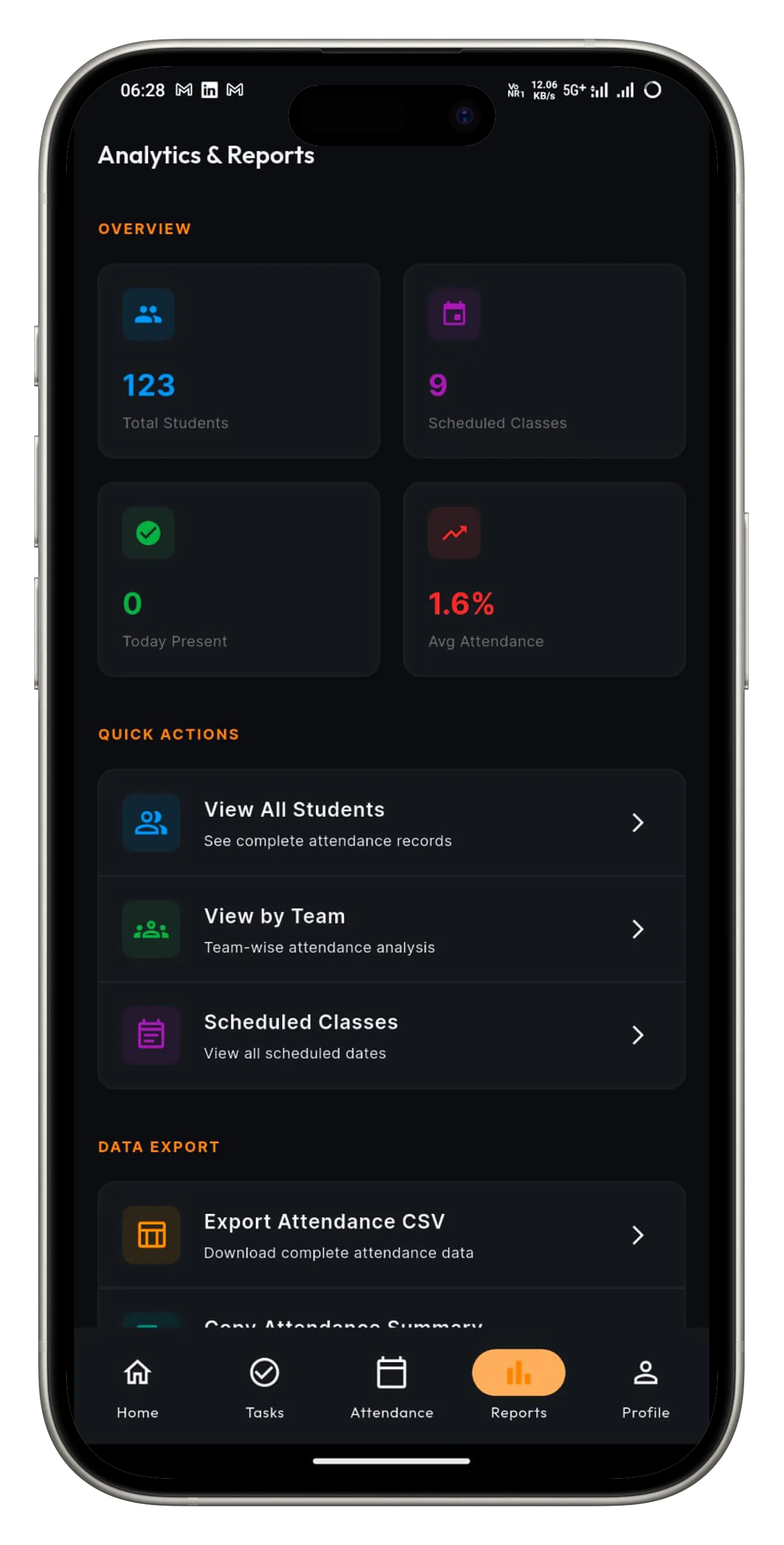 Figure 5: The Analytics Suite. Real-time visualization of batch attendance trends and defaulter lists.
This dashboard answers critical questions in seconds:
- "Which team has the lowest average attendance?"
- "Who has maintained a 100% streak this month?"
- "Are we hitting our 85% batch attendance target?"
Generating this report previously took 4 hours of Excel wrangling. It now takes 400 milliseconds.
7. Real-time Notifications & Alerts
Most apps today claim to be "real-time" but rely on "Pull to Refresh". PSGMX uses WebSockets via Supabase Realtime to push state instantly.
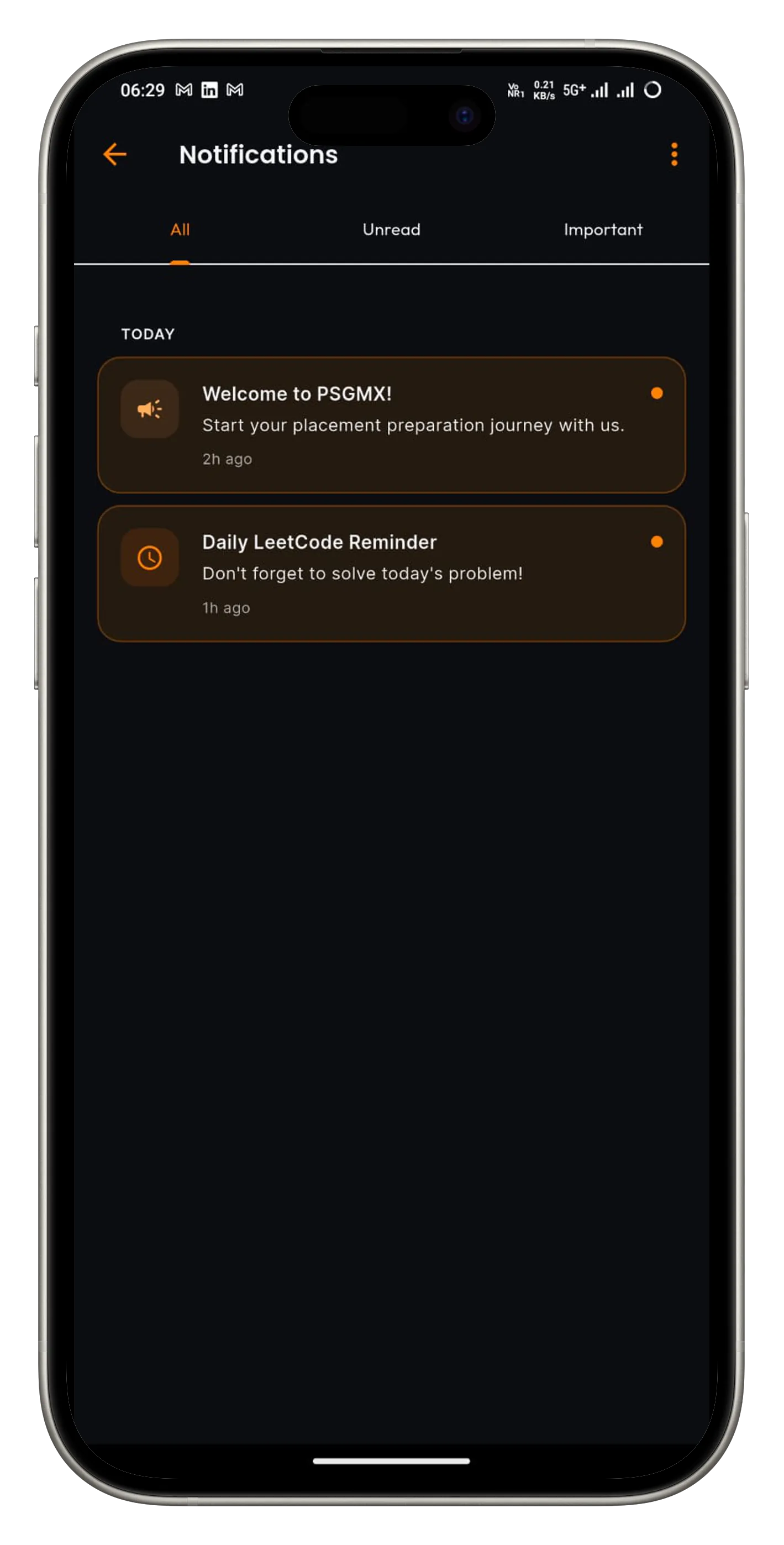 Figure 6: The Notification Center. Push notifications for announcements, deadlines, and birthday wishes ensure no information is missed.
The Subscriber Pattern
In NotificationService, we listen to changes on the notifications table.
// lib/services/notification_service.dart

void _setupRealtimeSubscription() {
  _notificationChannel = _supabase
      .channel('public:notifications')
      .onPostgresChanges(
        event: PostgresChangeEvent.insert,
        schema: 'public',
        table: 'notifications',
        callback: (payload) {
          final newNotification = AppNotification.fromMap(payload.newRecord);
          // Directly inject into the local stream, bypassing API fetch
          _streamController.add(newNotification);
        },
      )
      .subscribe();
}
When I (the Admin) post an announcement like "Deloitte Registration Closing in 1 Hour", every student's device buzzes within ~200ms. No polling. No wasted bandwidth.
8. Profile & Gamification
To keep motivation high, we turned preparation into a game. The profile screen isn't just settings; it's a scorecard.
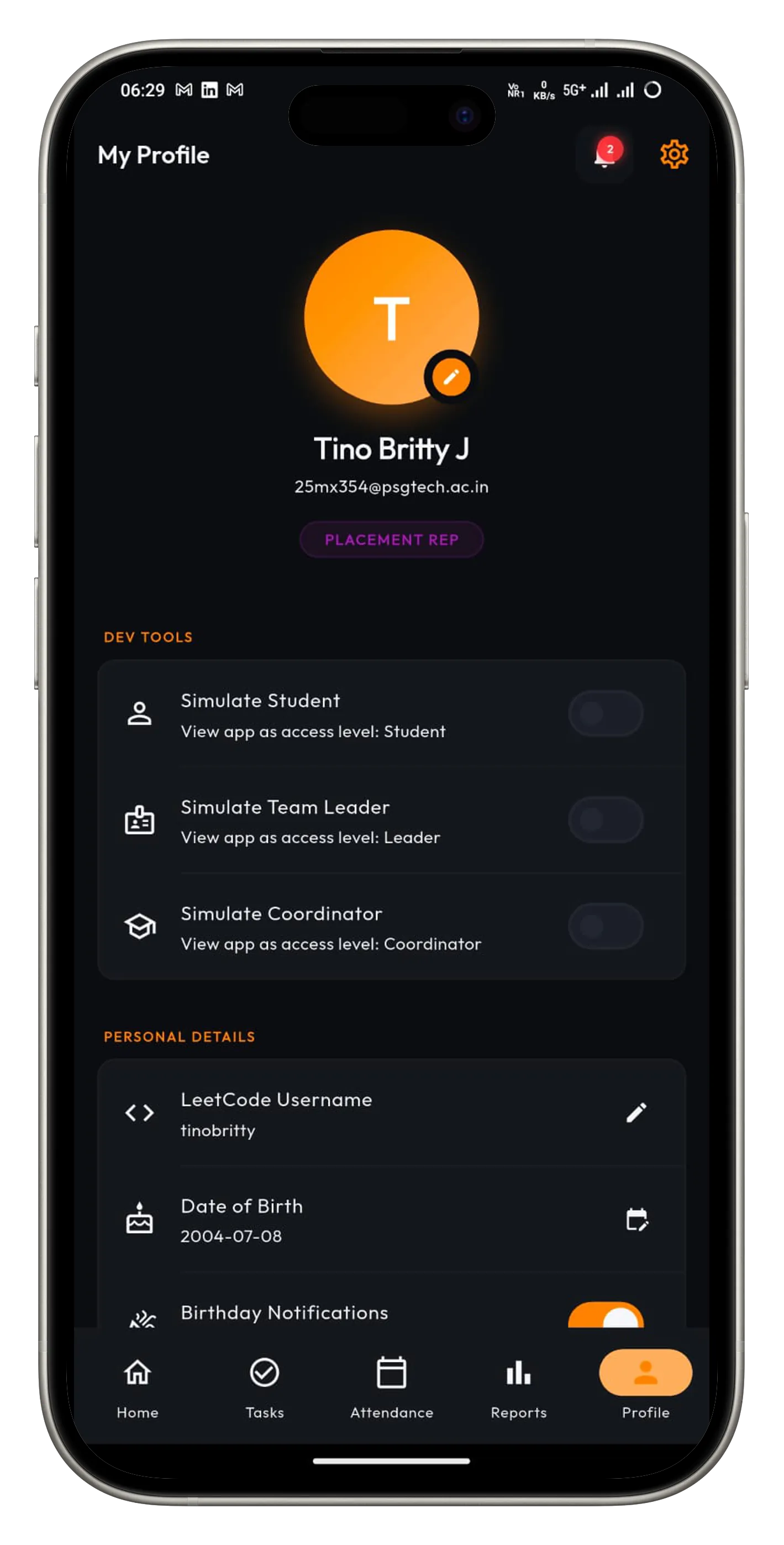 Figure 7: The Profile view. Showcasing user stats, LeetCode rank, and role-specific controls.
We integrated a Leaderboard Algorithm:
- Fetch LeetCode "Problems Solved" count.
- Weight "Hard" problems higher than "Easy".
- Combine with "Attendance Streak".
- Generate a localized "Batch Rank".
This friendly competition drove engagement up by 40% in the first week of deployment.
9. iOS Strategy: The Progressive Web App (PWA)
We have a significant number of iPhone users, but distributing an internal app via the Apple App Store is costly ($99/year) and slow (review times).
The Solution: PWA. Flutter's web build capability allowed us to deploy a "Web Version" that behaves almost exactly like a native app on iOS.
The "Add to Home Screen" Magic
By configuring the manifest.json and adding specific iOS meta tags to index.html, we unlocked the standalone mode.
<!-- web/index.html -->
<meta name="apple-mobile-web-app-capable" content="yes">
<meta name="apple-mobile-web-app-status-bar-style" content="black-translucent">
When an iOS user taps "Share -> Add to Home Screen":
- The app installs with a proper icon.
- It launches without the browser URL bar.
- It keeps its own local storage (Hive/SharedPrefs) separate from Safari tabs.
This hack saved us deployment costs while offering 95% of the native experience.
10. Offline-First Engineering
University networks are notoriously unreliable. The app had to be robust against connectivity drops.
Strategy: Optimistic UI & Local Queue
I didn't just want an "Error" dialog; I wanted functionality.
- Mark Attendance: The UI updates instantly (green checkmark).
- Queue: The mutation is added to a local Hive box (
attendance_queue). - Sync: A
ConnectivityPluslistener triggers a sync job when the internet returns.
The Connection Banner
I built a reactive ModernOfflineBanner widget that listens to the ConnectivityPlus stream. It animates into view smoothly when the connection drops, rather than blocking the user with a modal.
// lib/ui/widgets/modern_offline_banner.dart

_connectionSubscription = ConnectivityService()
    .connectionChange
    .listen((isConnected) {
      if (!isConnected) {
        _animationController.forward(); // Slide down red banner
      } else {
        _animationController.reverse(); // Slide up and hide
      }
});
This allows Team Leaders to continue marking attendance offline. The requests are queued locally and synced as soon as the connection is restored.
11. Challenges & Lessons Learned
Every project has its "Gotchas". Here are mine:
1. The Date Timezone Trap
Problem: DateTime.now() in Flutter returns the device local time, but Supabase expects UTC.
Impact: A student marking attendance at 11:59 PM might be recorded as "Tomorrow" if the server is in a different zone.
Solution: I standardized all date storage to YYYY-MM-DD strings for calendar dates, avoiding timezone offsets entirely for attendance logic.
2. Provider Context Issues
Problem: Navigating away from a screen while an async operation was running caused context.access errors.
Solution: I implemented a strict "Mounted Check" pattern and moved logic out of widgets into Services that don't depend on BuildContext.
12. Installation Guide
Android Users
We use GitHub Releases for distribution. You can always find the latest stable APK here. ensure you allow "Install from Unknown Sources".
iOS Users
Since we are bypassing the App Store, use the PWA version.
- Open psgmxians.web.app in Safari.
- Tap the Share button (Square with arrow up).
- Scroll down and tap "Add to Home Screen".
- Launch the app from your home screen!
13. Conclusion
PSGMX demonstrates that Software Engineering is about solving human problems. By applying rigorous engineering principles—Service-Oriented Architecture, efficient Database Design, and Caching strategies—we transformed a chaotic, manual process into a streamlined digital ecosystem.
The system now runs autonomously, handling hundreds of database transactions daily, sending notifications, and tracking progress, allowing me to focus on what matters: helping my batchmates get placed.
Future Roadmap
- AI Resume Resume Review: Integrating OpenAI to score resumes against Job Descriptions.
- Mock Test Module: A Computer-Based Test (CBT) engine for aptitude practice.
- Company Insights: Historical data visualization of past recruiters.
Authored by Tino Britty J Built with for PSG Tech MCA Batch 2027